
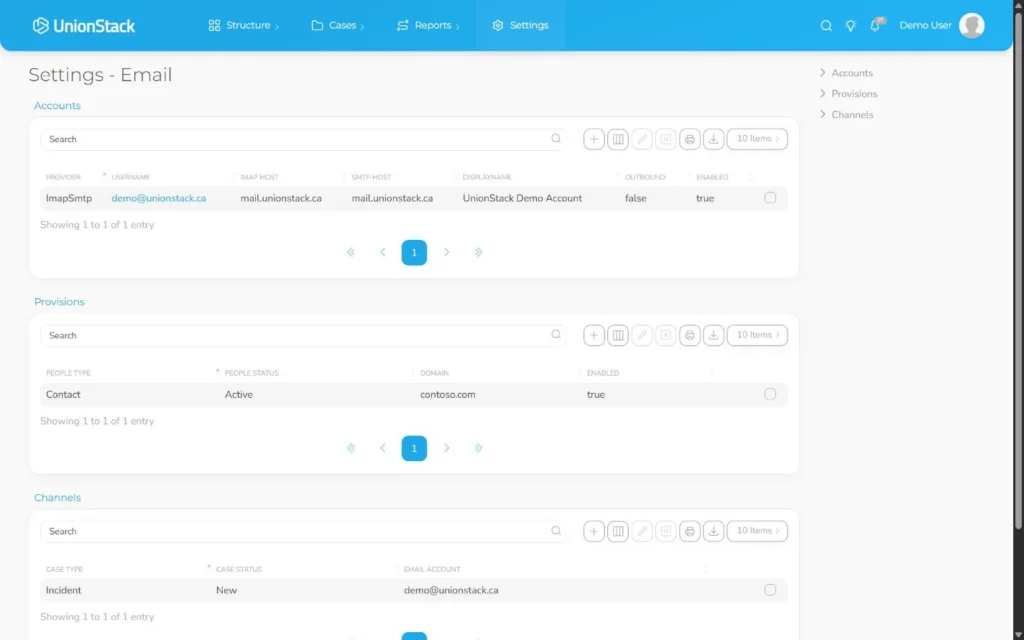
Union representatives often receive case information through Microsoft or Gmail mailboxes. UnionStack can connect supported Microsoft accounts used with Outlook, supported Gmail accounts, or approved IMAP and SMTP services. Authorized users can then relate relevant conversations to cases, people and organizational entities.
The goal is not to turn every message into a case record. It is to preserve the conversation while making its operational relationship explicit.
Choose the connection that matches the provider
Microsoft accounts used with Outlook
UnionStack supports a Microsoft OAuth connection path. The authorized user signs in with Microsoft and reviews the requested access through the provider experience. The Microsoft password should not be copied into a UnionStack note or custom field.
Gmail accounts
Supported Google accounts can use the Gmail OAuth path. As with Microsoft, the provider handles sign-in and consent. Test the connection with an approved mailbox and controlled messages that contain no confidential member information.
Other approved providers
IMAP and SMTP settings can support another approved provider when the organization has the required incoming and outgoing server details, ports, encryption settings and credential method. Document who owns the connection and how password or server changes will be handled.
A controlled setup workflow
- Approve the mailbox. Confirm organizational ownership, intended users, provider policy and the records the mailbox will support.
- Connect through the provider path. Use Microsoft or Gmail authorization where supported, or approved IMAP and SMTP settings.
- Verify addresses and signature. Confirm the identity recipients should see and send a controlled message to an internal address.
- Test inbound retrieval. Open a test conversation and verify subject, sender, recipients, message order, importance and attachments.
- Relate the conversation. Connect the thread to the case, person or entity that explains why it matters.
- Validate with another user. Ask an authorized colleague to find the conversation from the case and explain its relevance.
Why relationships matter
Copying an email body into a case note creates another version that can lose recipients, attachments and later replies. A relationship keeps the conversation as the communication record while the case holds the procedure, analysis and outcome.
A thread may be related to a grievance and the affected member. Add relationships deliberately; connecting every participant to every record can make discovery less meaningful.
Handle attachments intentionally
Before maintaining an attachment, confirm that it is relevant and that the organization is authorized to retain it. Use clear names and connect the document to the record that owns its purpose. Apply the union’s access, retention and legal-hold requirements.
Do not assume that an attachment inherited from email has the correct version or provenance. Record who supplied material and whether it is final when that information affects the case.
Plan for authorization failures and staff changes
Provider consent can expire, credentials can rotate and server settings can change. The team should know how a failed connection is surfaced, who investigates and how recovery is validated with a new controlled message.
When mailbox ownership or job responsibilities change, review both the provider account and UnionStack access. A case handoff should not depend on continued access to the former representative’s private mailbox.
Separate operational email from campaigns
Case and member correspondence differs from bulk campaigns. Campaign platforms handle audience segmentation, delivery, unsubscribe and analytics requirements. UnionStack provides a Mailchimp integration path in addition to connected operational email.
Document which system is authoritative for consent and audience membership. Avoid sending sensitive case information through a campaign workflow simply because it reaches many recipients.
Evidence to request in a demonstration
Ask the vendor to connect a test mailbox without exposing a password, retrieve a multi-message conversation, relate it to a sample case, send a controlled reply and show the result to another authorized user. Then ask how expired authorization, staff departure and attachment retention are handled.
Explore UnionStack’s email management workflow and use the related guides for Microsoft, Gmail, IMAP/SMTP and case relationships.
Video demonstration
A captioned UnionStack 2.0 demonstration using fake data to review an email connection and relate a conversation to union work.
Related product capability
Union email management software
Review the product evidence, buyer guidance and connected workflows behind this article.
Explore Union email management software →