
Workflow context
What this guide helps you accomplish
Choose an approved email account connection and keep relevant UnionStack messages with the records they concern.
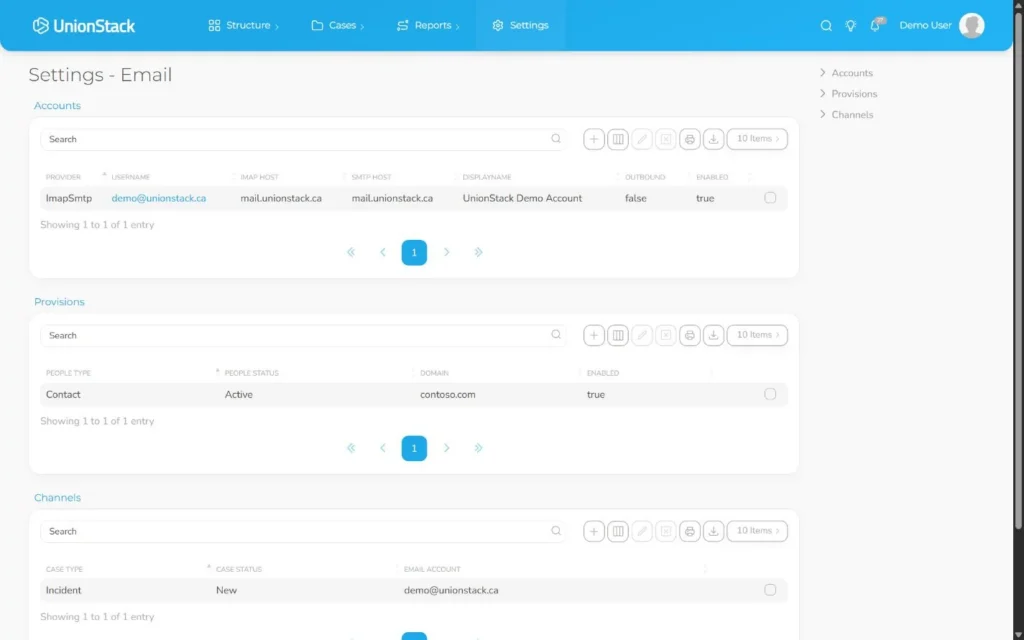
Choose the provider connection that matches the mailbox, then test authorization, inbound retrieval and outbound identity before relating production work.
Email integration is most valuable when relationships to people, entities and cases are consistent and easy to understand.
Before you begin
Prepare the following before changing shared configuration or records:
- An approved test mailbox or fake conversation and permission from the mailbox owner to connect it.
- A fake case, person or entity that explains why the communication or meeting matters.
- The organization’s rules for sensitive attachments, meeting material, retention and access.
- An approved fake mailbox and a controlled message that contains no personal or confidential information.
Procedure
Complete the steps in order with fake or approved test information first. Record configuration decisions that will affect other teams.
Choose the account model
Use Microsoft OAuth, Gmail OAuth or configured IMAP and SMTP details according to provider and organizational security requirements.
Connect through Email settings
Have an authorized user complete provider sign-in or enter approved server details. Do not place mailbox credentials in notes.
Confirm identity and signature
Review connected addresses, outbound settings and the signature recipients should see, then send a controlled internal test.
Review the conversation
Verify sender, recipients, subject, importance and attachments before relating the thread to a record.
Connect it to the work
Relate the conversation to the correct case, person or entity instead of copying the body into a note.
Handle attachments intentionally
Store only relevant documents and follow retention and privacy rules. Confirm the case team can locate them.
Product view
Video demonstration
Follow the principal workflow in this captioned demonstration. The recording uses fake records in the UnionStack test environment.
Troubleshooting
Use the symptoms below to diagnose the workflow before widening access, adding duplicate configuration or bypassing an intended control.
Mail appears in the provider but not UnionStack
Confirm authorization, account ownership, folders and the connection’s latest status. Test with a new controlled message before reconnecting or changing server settings.
Provider authorization expires or is refused
Confirm the account, provider and consent screen are correct. Reauthorize through the supported connection flow rather than placing passwords or tokens in notes.
A conversation or meeting is connected to the wrong record
Remove the incorrect relationship through the approved workflow, verify identity and case reference, then connect the authoritative record and document the correction if needed.
Other users cannot find the expected material
Check their access, the relationship to the case or entity, document version and meeting participant records. Do not widen access until the intended audience is confirmed.
Validation checklist
Do not treat the procedure as complete until an authorized second person can reproduce the intended result.
- The approved mailbox retrieves and sends the controlled message using the expected identity.
- The connected account can complete the intended controlled inbound or outbound test.
- The conversation or meeting is related to the record that explains its operational purpose.
- Participants, recipients and attachments are complete and visible only to the intended users.
- A second authorized user can retrieve the material without searching a separate personal system.
Version applicability
This guide was verified for UnionStack 2.0 on August 16, 2026. Available fields, types, relationships, navigation and access can vary with tenant configuration and user permissions.
Corresponding product capability
Union email management software
See the feature evidence, connected workflows and buyer guidance behind this procedure.
Explore Union email management software →Continue learning
Return to the UnionStack Learning Centre, or take the UnionStack product tour to see how these parts connect.