
Workflow context
What this guide helps you accomplish
Review UnionStack configuration on a repeatable schedule so the platform continues to reflect current work.
A recurring review keeps configuration aligned with current procedures while preventing one-off fields, obsolete access and abandoned integrations from accumulating.
Configuration should evolve through evidence and accountable review rather than accumulate through one-off requests.
Before you begin
Prepare the following before changing shared configuration or records:
- Administrator access to a UnionStack test organization and a written description of the procedure you are configuring.
- A small set of fake records that covers an ordinary example and at least one exception.
- A named configuration owner who can approve terminology, access and any change to shared settings.
- Usage questions, workaround examples, access lists and change requests collected since the previous review.
Procedure
Complete the steps in order with fake or approved test information first. Record configuration decisions that will affect other teams.
Set a review cadence
Choose a schedule appropriate to the pace of organizational change. Include additional reviews after major bargaining, restructuring or policy changes.
Collect evidence before changing
Review user questions, unused fields, duplicate values, reporting gaps and workarounds. Separate training issues from configuration issues.
Assess types and relationships
Confirm that people, entity, position and case types still represent meaningful differences. Look for overlapping or disconnected structures.
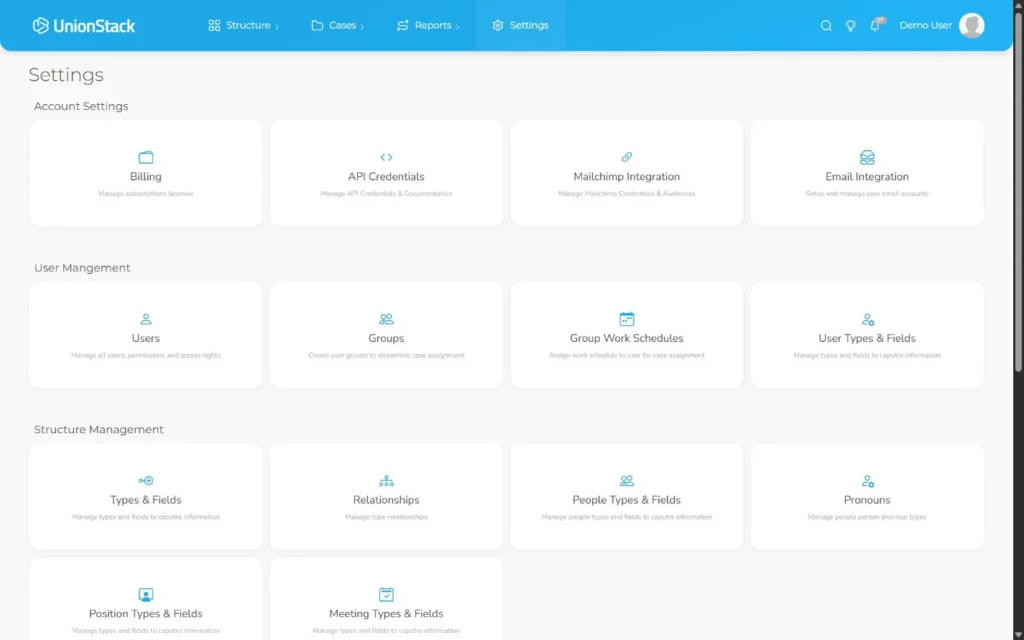
Review users and integrations
Verify active users, administrator responsibilities, connected email accounts, sites and API credentials. Remove obsolete access through the approved process.
Test and document changes
Use representative records in a controlled review, communicate the impact and record why each change was approved.
Product view
Video demonstration
Related demonstration
Configure types and fields safely
This conceptual guide shares the demonstration used by the main hands-on procedure.
Watch the captioned demonstration →Troubleshooting
Use the symptoms below to diagnose the workflow before widening access, adding duplicate configuration or bypassing an intended control.
Every user request is treated as a configuration change
Separate missing training, poor source data and genuine model gaps. Approve a shared change only when evidence shows it benefits the maintained procedure.
Users describe the same concept with different names
Pause configuration and reconcile the labels used in policies, forms and everyday work. Choose one preferred term and document any legacy synonyms for onboarding.
A pilot user can see too much or too little
Compare the user’s actual responsibility with the planned access matrix. Correct the role or group assignment, then repeat the test with a second representative account.
The configuration works only for the sample record
Add an unusual but valid scenario and trace it through the same procedure. Adjust the model only when the difference affects a real decision, relationship or report.
Validation checklist
Do not treat the procedure as complete until an authorized second person can reproduce the intended result.
- Approved changes have an owner, test result, effective date and explanation that future administrators can find.
- A second administrator can explain the configuration and its owner without relying on undocumented knowledge.
- A pilot user can complete the intended task without a spreadsheet, private note or duplicate record.
- Names, statuses and structured choices match the approved terminology list.
- Access was tested with representative non-administrator accounts.
Version applicability
This guide was verified for UnionStack 2.0 on August 16, 2026. Available fields, types, relationships, navigation and access can vary with tenant configuration and user permissions.
Corresponding product capability
Union management software
See the feature evidence, connected workflows and buyer guidance behind this procedure.
Explore Union management software →Continue learning
Return to the UnionStack Learning Centre, or take the UnionStack product tour to see how these parts connect.